Running Fuzzers Locally
Installing Dependencies
To begin fuzzing in OpenVMM, you'll need to install cargo-fuzz.
Installation should be as simple as:
cargo install cargo-fuzz
For debugging crashes, a debugger such as lldb is useful:
sudo apt-get install -y lldb
For coverage reports, install llvm-tools and lcov:
rustup component add llvm-tools
sudo apt-get install -y lcov
cargo-fuzz requires a nightly toolchain as it compiles targets with
ASAN to
improve the likelihood of finding bugs and the reproducibility of testcases.
Fuzzing only works on Linux. libfuzzer-sys doesn't support Windows.
On aarch64, you must set RUSTFLAGS="-Ctarget-feature=+lse,+neon" before
any cargo-fuzz command (build, run, coverage), or builds will fail with
atomics errors. This is not needed on x86_64.
Running
While it's entirely possible to run the various fuzzers in the OpenVMM repo using
cargo fuzz directly, the OpenVMM repo includes additional tooling to streamline
working with fuzzers at "OpenVMM scale": cargo xtask fuzz
cargo xtask fuzz bridges the gap between cargo fuzz's "crate-oriented"
tooling, and OpenVMM's "repo-oriented" tooling.
e.g: instead of manually navigating to each individual crate/fuzz directory in
order to use cargo fuzz, with cargo xtask fuzz, you can list/run/build any
fuzzer in the OpenVMM repo, regardless where it happens to be in the repo!
Before you can run a fuzzer, you need to know its name. To see a list of all fuzzers currently in the OpenVMM tree, you can run:
cargo xtask fuzz list
The output will be a list of available "fuzz targets":
$ cargo xtask fuzz list
fuzz_chipset_battery
fuzz_ide
fuzz_scsi_buffers
Once you've got a fuzzer you're interested in running (e.g: fuzz_ide),
starting a fuzzing session is as easy as running:
cargo xtask fuzz run fuzz_ide
And you're off! If you see a whole bunch of terminal spew, congrats, you're fuzzing!
When run locally using the above command, the fuzzer will run indefinitely until a crash is discovered.
Building without running
To just build a fuzzer without starting it:
cargo xtask fuzz build fuzz_ide
The binary lands at target/<triple>/release/fuzz_ide.
Reproducing a crash
When LibFuzzer finds a crash, it saves the input as an artifact. Reproduce it:
# Through xtask (sets XTASK_FUZZ_REPRO=1 automatically for tracing)
cargo xtask fuzz run fuzz_ide path/to/crash-artifact

# Or run the binary directly (faster for iteration)
./target/<triple>/release/fuzz_ide path/to/crash-artifact

# With tracing enabled (verbose — shows device state at each poll)
XTASK_FUZZ_REPRO=1 ./target/<triple>/release/fuzz_ide path/to/crash-artifact
Minimizing crash inputs
cargo xtask fuzz tmin fuzz_ide path/to/crash-artifact
Corpus management
Corpus files live in <crate>/fuzz/corpus/<target>/.
Crash artifacts land in <crate>/fuzz/artifacts/<target>/.
To minimize the corpus (remove redundant inputs):
cargo xtask fuzz cmin fuzz_ide
Parallel fuzzing
Use -fork=N to run N fuzzer processes in parallel across CPUs:
cargo xtask fuzz run fuzz_ide -- -- -fork=20 -max_total_time=3600 -print_final_stats=1
To survive crashes/timeouts/OOMs during long campaigns:
cargo xtask fuzz run fuzz_ide -- -- \
  -fork=20 -max_total_time=21600 \
  -ignore_crashes=1 -ignore_timeouts=1 -ignore_ooms=1 \
  -print_final_stats=1
If you need to tweak the runtime behavior of the command, all of libFuzzer's commandline options are at your disposal. Alternatively you can print the help of the fuzzer like so:
# NOTE: The "-- --" is required to differentiate between `xtask fuzz`'s
# extra-args, and `cargo fuzz`'s extra-args
cargo xtask fuzz run fuzz_ide -- -- -help=1
Other Fuzzing Commands
The cargo xtask fuzz CLI includes plenty of docs via --help text. Don't be
afraid to dig into all the tools available via cargo xtask fuzz by using
--help at both the top-level, and for more details regarding the various
subcommands.
Note that most cargo xtask fuzz commands mirror those from cargo fuzz, so
for additional information on how certain commands work, check out the
cargo-fuzz book.
Coverage
The effectiveness of fuzzing can be measured with code coverage.
Code coverage can be analyzed to determine which branches in the target were exercised and which were missed by the fuzzer. This can be used to determine if the fuzzer needs improvements or is doing an adequate job.
Before you begin you'll need some additional dependencies to generate an html report:
rustup component add llvm-tools
apt install lcov
To generate a report with "sane defaults", you can simply run:
cargo xtask fuzz coverage fuzz_ide --with-html-report
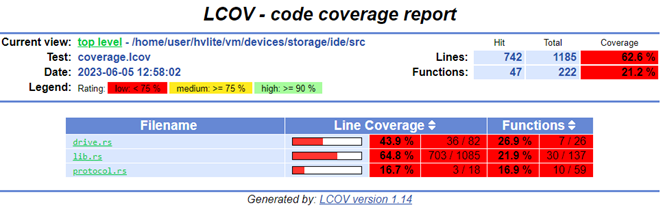
Simply navigate to the html/report/dir/index.html on your machine and inspect the coverage!
The overall coverage percentage in the HTML report covers all compiled code
including dependencies — it's typically 4–6% and meaningless. Focus on coverage
of the target crate itself (e.g., ide/src/lib.rs, storvsp/src/lib.rs).
--with-html-report offers a quick-and-easy way for an individual user
generate a coverage report locally, but it may not be entirely appropriate for
more "industrial scale" fuzzing pipelines.
Manual Coverage Generation (Advanced)
The basic way this is done is by running all the discovered input testcases
through the fuzzer and merging all the coverage events together (remember, the
fuzzers only save testcases which generate new coverage). Cargo-fuzz provides a
way to do this with the coverage subcommand. This step generates a
coverage.profdata file which can be turned into a human-readable HTML report:
# cargo xtask fuzz coverage <fuzzer name>
cargo xtask fuzz coverage fuzz_ide
# confirm coverage.profdata was created
ls -l coverage.profdata
OR if you have a large number of inputs (5k+) the below will collect and merge coverage significantly faster:
# rebuild the fuzzer with coverage instrumentation
RUSTFLAGS="-C instrument-coverage" cargo fuzz build
# set env var to rustup's llvm-tools
LLVM_TOOLS_PATH=$(dirname $(find $(rustc --print sysroot) -name 'llvm-profdata'))
# make an output directory for corpus minimation
mkdir min_corp
# run the minimizer putting the raw cov data into coverage.profraw
LLVM_PROFILE_FILE="coverage.profraw" ./fuzz/targets/<target-path>/release/fuzz_ide min_corp <path to input corpus directory> -merge=1
# merge the raw data into coverage.profdata
$LLVM_TOOLS_PATH/llvm-profdata merge -sparse coverage.profraw -o coverage.profdata
Next find the location of the llvm-tools you installed with rustup (NOTE: rustup is used to install the LLVM tools to ensure that rust's llvm version and the tool version are in sync), and convert the coverage data into a report:
# set env var to rustup's llvm-tools
LLVM_TOOLS_PATH=$(dirname $(find $(rustc --print sysroot) -name 'llvm-profdata'))
# convert the coverage data into an lcov format
$LLVM_TOOLS_PATH/llvm-cov export -instr-profile=coverage.profdata \
    -format=lcov \
    -object ./fuzz/targets/<target-triple>/coverage/<target-triple>/release/fuzz_ide \
    --ignore-filename-regex "rustc" > coverage.lcov
# summarize the coverage information
lcov --summary ./coverage.lcov
# make an output directory for the html report
mkdir -p lcov_html
# generate the html report
genhtml -o lcov_html --legend --highlight ./coverage.lcov